The Club is proud to be
associated with the
following companies
and recommends their
services to members.
Click here for links!!
THE CLUB
Skip Navigation Links
Go to the Home Page Home Page
ClubExpand  Club
Ladies SectionExpand  Ladies Section
O60s SectionExpand  O60s Section
Premier League
Club leagues Leagues
Club competitions Competitions
Email us Contact Us
Misc 2nd hand Items that can be bought from the club Items for Sale
See what pages have been updated recently Latest
Simple utility to provide team captains with a simple method of allocating team members to games Utility -
    Captain's Sheet
THE WEB SITE
Skip Navigation Links
How it all worksExpand How it all works
League Fixture PlanningLeague Planning
Knock out competition planningKO Comp Planning
Who edits and maintains the webThe Spiders
SUB-WEBS ETC.
Skip Navigation Links
Sub web.
   club/assocs etc.
Expand Sub web.<br/>&nbsp;&nbsp;&nbsp;club/assocs etc.
Misc outdoor competitions, non-clubOutdoor Comps.
Misc outdoor leagues, non-clubOutdoor Leagues
MISC. OTHER
Skip Navigation Links
Link to the Super8serieS web site that will be running at the clubSuper8serieS
Links to other sitesLinks


Configuring Outlook Express

To configure outlook express to collect mail from our mail servers perform the following tasks.

1. Start Outlook Express

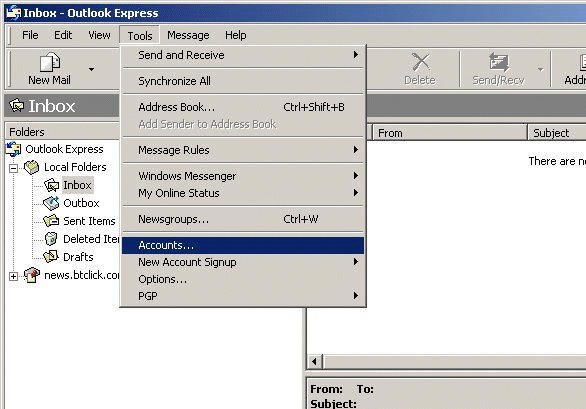
2. From the toolbar menu choose the Tools option and then select Accounts from the drop down list
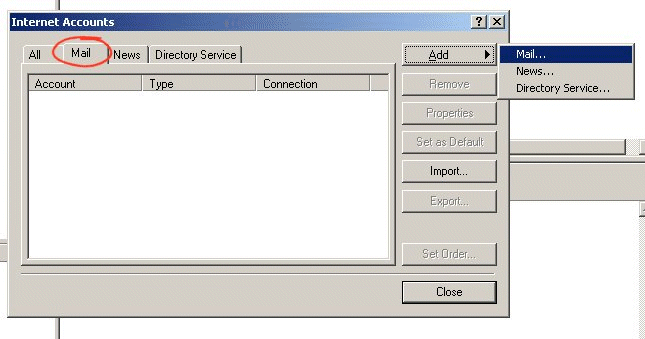
3. From the box that appears select the Mail tab as shown below and then click on the Add button. A small context menu will appear from which you should choose Mail
4. The first thing you are asked for is your name so enter this in the box as shown below. This will be the name that mail will appear to be from, so if you want your mail to be from Joe Bloggs then enter this.
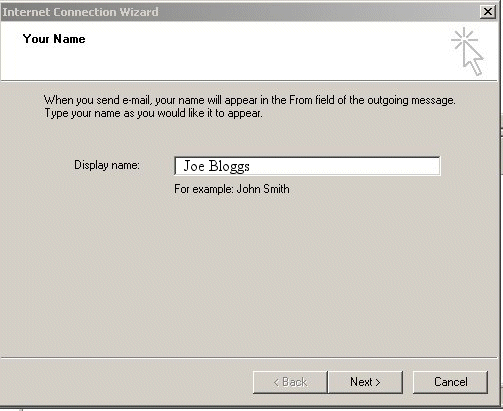
When you have done this click Next

5. The next box asks you to enter your e-mail address for this account joe@lincolnindoorbowlsclub.co.uk
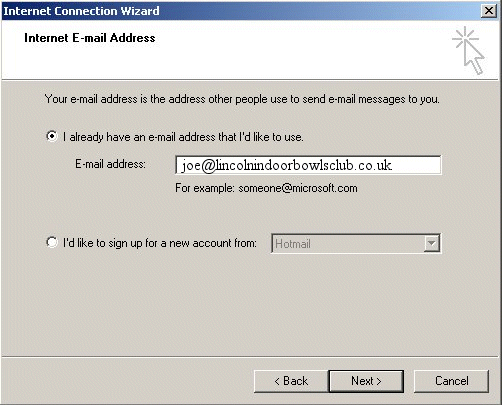
When you have done this click Next

6. At this point you will be asked to enter your mail server names. Both incoming and outgoing are mail7.hostinguk.net
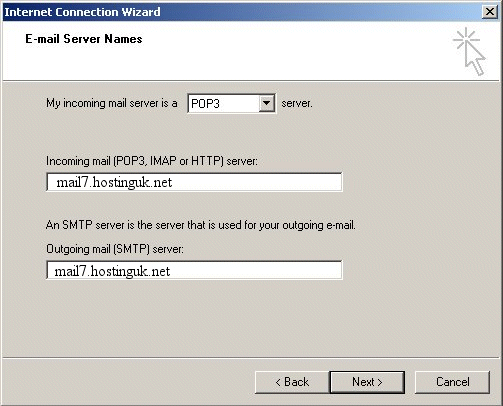
When you have done this click Next

7. At this screen you are promoted for your Account name and password for mail. In the "Account name" box enter your email address in total (e.g. joe@lincolnindoorbowlsclub.co.uk) and your password exactly as you have been given.
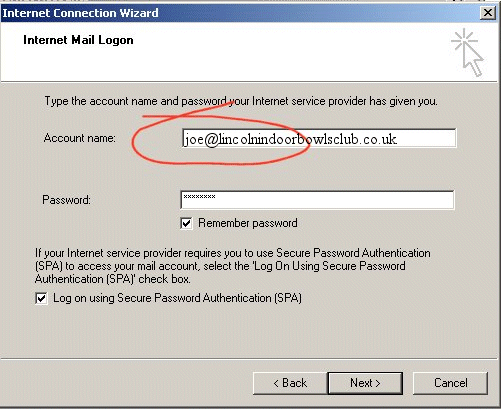
When you have done this Click next and at the next screen click Finish.

You should now be able to send and receive mail using your new mail account.

    This page Copyright © 2007 - 2011 LINCOLN AND DISTRICT INDOOR BOWLING CLUB COMPANY LIMITED
Company No 01007036 - All rights reserved. Web site designed and built by David Lyon with content by "The Spiders"
Web editor Danny Brown